Imagor Studio

Self-hosted image gallery with built-in editing.
Templates, multi-layer compositing, drag-and-drop management.
No cloud subscriptions, no vendor lock-in.

Template Workflows

Save editing workflows as templates and apply them to different images. Create once, reuse across your entire photo library.

Imagor Studio Template Workflows

High-Performance Gallery

Browse and organize your image files with virtual scrolling, drag-and-drop management, folder navigation, and multi-select for bulk operations.

Imagor Studio Gallery Interface

Multi-Layer Editing

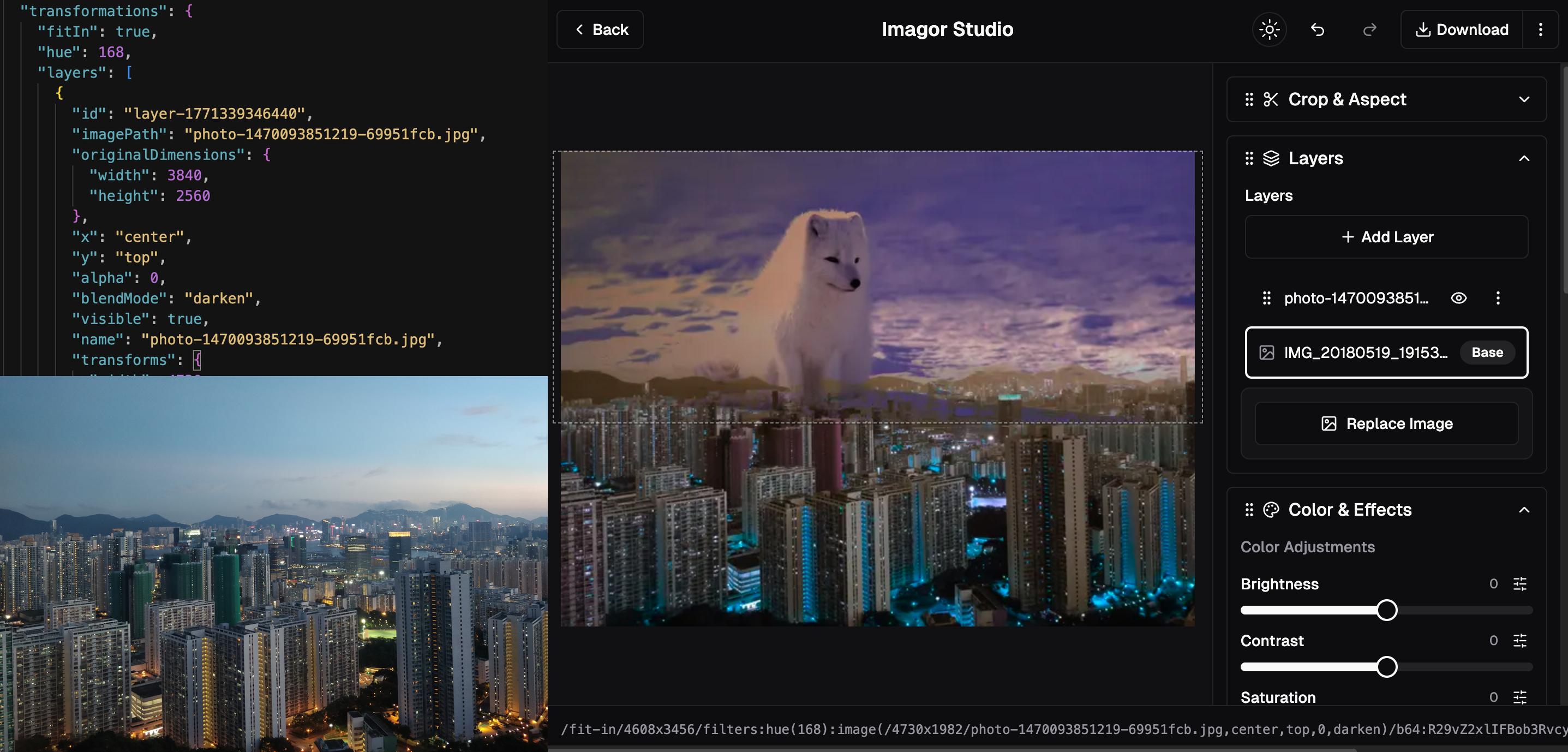
Edit images with multi-layer compositing and real-time preview. Stack images, add watermarks, create complex compositions. All transformations are URL-based.

Imagor Studio Multi-Layer Editor

Template Workflows

Save editing workflows as reusable templates. Stored as portable JSON files, apply the same edits across your entire image library.

Imagor Studio Template Workflows

High-Performance Gallery

Browse and organize your image files with virtual scrolling, drag-and-drop management, folder navigation, and multi-select for bulk operations.

Imagor Studio Gallery Interface

Quick Start

Get started with Imagor Studio using Docker

Run with your image directory mounted

You can replace ~/Pictures with the path to your preferred directory (e.g., ~/Desktop, ~/MyPhotos, ~/Downloads).

docker run -p 8000:8000 --rm \
  -v $(pwd)/imagor-studio-data:/app/data \
  -v ~/Pictures:/app/gallery \
  -e DATABASE_URL="sqlite:///app/data/imagor-studio.db" \
  shumc/imagor-studio

Open in browser

http://localhost:8000

What this does:

  • Mounts your Photos directory
  • Creates persistent storage for the app database (SQLite)
  • Redirects to admin setup process on first launch

Ready to dive deeper? Check out Documentation

Documentation

A Complete Image Processing Ecosystem

Why Imagor Studio?

We were serving millions of images but needed better tools for managing and editing them. When we looked at alternatives, they all wanted premium prices for basic features, or locked you into their cloud infrastructure.

So we built Imagor Studio - open source, self-hosted, and designed for people who want control over their images and workflows. It's built on years of development, from vipsgen to imagor, now serving millions of images in production. Your support enables continued development.

No subscriptions. No vendor lock-in. Just tools that work the way you need them to.

Virtual Scrolling Gallery

Browse thousands of images instantly. No indexing, no waiting, no sync process. Just point to your folder and start working. Powered by libvips for fast processing.

Image Editing

Image editing with real-time preview and multi-layer compositing. Get instant URL generation for transformed images. Your originals stay untouched.

Template Workflows

Save editing workflows as templates and apply them to different images. Create once, reuse everywhere. Stored in open JSON format.

Multi-Layer Editing

Stack and composite multiple images with independent transformations. Perfect for watermarks, overlays, and complex compositions.

Drag-and-Drop Management

Upload files and organize with drag-and-drop. Multi-select for bulk operations. Keyboard navigation support.

Non-Destructive Workflow

Original files remain untouched. All transformations are applied dynamically via URL-based processing.

Universal Storage

Works with local filesystems, S3, MinIO, Cloudflare R2, and other S3-compatible storage solutions.

Edit History

Undo and redo support with full editing history. URL state persistence for shareable editing sessions.